Please wait...


Profile and Settings
Here's a sample Profile and Settings page:
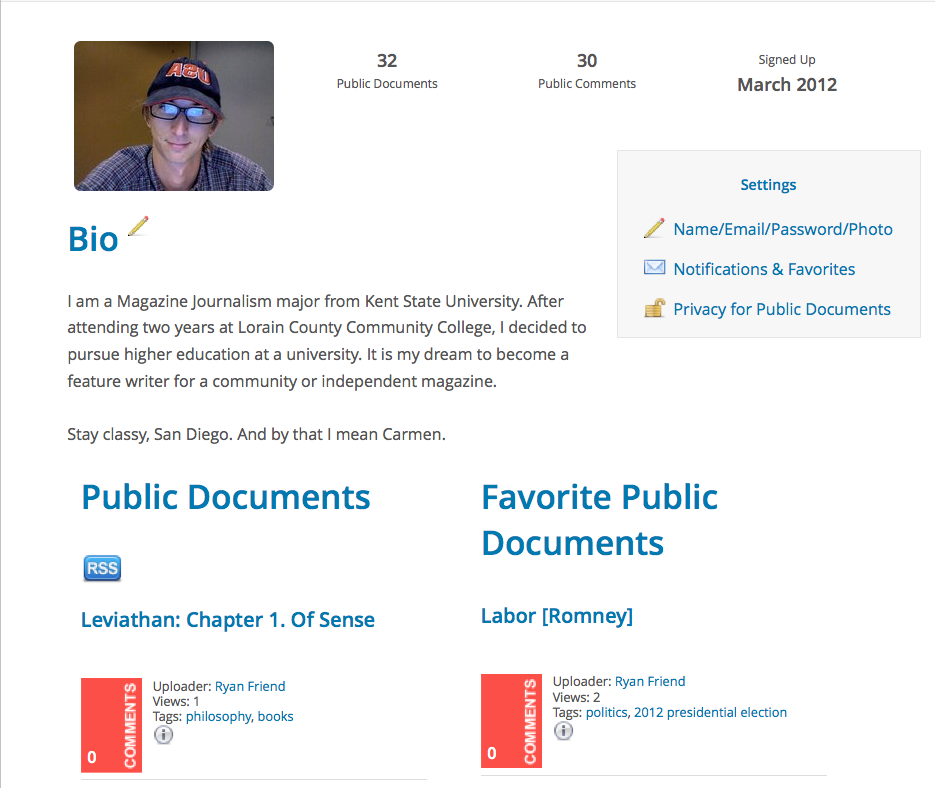
You get to this page by clicking the triangle next to your name at the top of every page:

and choosing “Profile and Settings”. From there you can:
- Create or edit your Bio (optional)
- Edit your Profile information:
- Name (titles such as Prof., Dr., Mr., Mrs., or Ms. are optional)
- Email Address — if you're using NowComment as part of a class or corporate group be sure to use the address that your group uses for you
- Password
- Photo or image (optional) — we highly recommend uploading your photo; it lets everyone instantly connect your comments with you! If you don't upload a photo (or other image of your choice) then the system will assign you a random nature image instead.
- Time zone (optional) — this lets the site “translate” all the system's comment and notification times to your time zone
- Set Notifications & Favorites preferences
- Set privacy preferences for Public Document
It's nice for your readers to know that, when you're commenting on astrophysics, you really are a rocket scientist! Click the pencil icon to input or edit whatever you'd like to show here.
NowComment's flexible comment notifications system lets you control the volume of emails you get when people comment on your documents. You can choose to get notified only when people reply directly to you, or when they comment on a conversation you've posted to, or each time someone comments on one of your “Favorite” documents or on a document in a Favorite Group, etc. For more information see our Features Gallery page.
These let you control what information about Public Documents other users can see on your Profile page. Most people check all the boxes, because the idea of Public Documents is publicize them as much as possible, but if you want to have some restrictions you can set them here.
There's also a blue RSS button that people can click to automatically be informed by RSS of new Public Documents that you upload. Private Documents don't show on the RSS feed; only people and Groups you specifically invite to Private Documents know about or can access them.
[Last updated January 16, 2015]
 icons on the left to see existing comments.