Please wait...


Multiple Views of a
Document and its Comments
NowComment® has four different views to help you read documents and their comments more easily; a pull-down menu in the bottom toolbar of a document page (shown below) lets you switch between them:
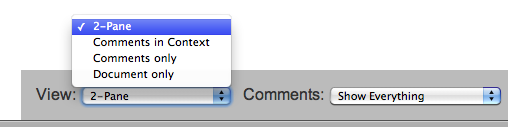
The four views are:
- 2-Pane View (default) puts the document in the left pane and related comments in the right pane. We describe 2-Pane at length in our video and text overviews.
- Comments in Context puts the original document and the comments related to it together in a single window. Conversations appear directly below the corresponding sentences and paragraphs of the document to make it easy to read the documents and all the comments at once.
You can use a printout of this view for discussion whenever computer use isn't possible. Note: we assume your computer has the ability to print to PDF. This is built in to Macs and Linux boxes and relatively new PCs. If you PC doesn't have "print to PDF" capability you can get it easily (it's very very handy!) by downloading a free program like CutePDF Writer
Though this view looks different from the 2-pane view, it works just like it, except that to create Sentence comments you click on the text of that Sentence; to create Paragraph comments you double-click on empty white space anywhere in the shaded Paragraph area. In both cases those clicks open an Add Comment window.Comments in Context and 2-Pane View are the only two views that let you add new comments to a document.
- Comments Only shows just the comments and offers four ways to sort them:




- Commenter Sort is used to see all of a person's comments at one time (e.g. when a teacher wants to grade each student's comments). Names can be sorted A-Z or Z-A.
- Date Sort lists comments chronologically (oldest to newest or vice-versa). This is helpful when you want to see all comments made since your last site visit, or before/after a certain date.
- Tag Sort groups comments by tag (keyword). Tags can be very useful when discussing a document from different perspectives (e.g. an executive might want to see comments tagged "marketing" all together, then see all comments tagged "accounting", etc.).
- Document Sequence sorts comments by document position.
- Document Only shows the original document without any comments; this lets you read without any distraction from comments (and also see the document in a bigger window).
We have more tip files and short videos that walk you through using NowComment… or skim our "Features Gallery".
 icons on the left to see existing comments.